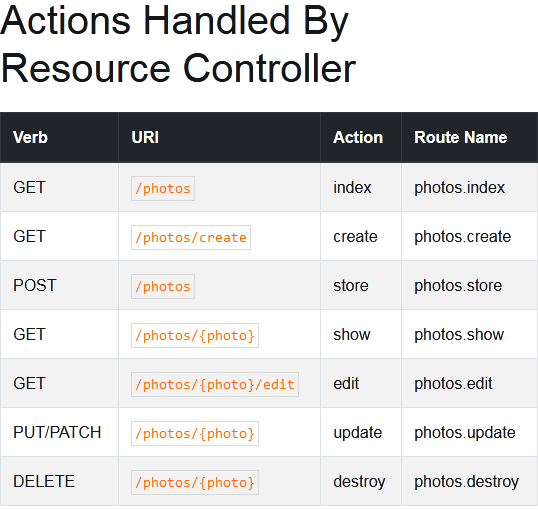
Create Laravel Project
composer create-project --prefer-dist laravel/laravel Projectname
Database Connection : Open .enf File And Edit
DB_CONNECTION=mysql
 DB_HOST=127.0.0.1
 DB_PORT=3306
 DB_DATABASE=here your database name here
 DB_USERNAME=here database username here
 DB_PASSWORD=here database password here
Create Migration File : open Cmd In Project Folder And Run Script
php artisan make:migration migrationfilename
Create Database Table And Column With Migration File : open migration File And edit with tablename
public function up()
 {
     Schema::create('tablename', function (Blueprint $table) {
         $table->increments('id');
         $table->string('name')->nullable();
         $table->string('email')->nullable();
         $table->timestamps();
     });
 }
Migration Comand:
php artisan migrate
Migration Rules :
<?php

use Illuminate\Database\Migrations\Migration;
use Illuminate\Database\Schema\Blueprint;
use Illuminate\Support\Facades\Schema;

class CreateOITMSTable extends Migration
{
    /**
     * Run the migrations.
     *
     * @return void
     */
    public function up()
    {
        Schema::create('o_i_t_m_s', function (Blueprint $table) {
            $table->id();
            $table->engine = 'InnoDB';
            $table->boolean('is_publish')->default(0);
            $table->charset = 'utf8mb4';
            $table->string('ItemCode',50)->comment('Item No.');
            $table->string('CodeBars',254)->comment('Bar Code');
            $table->mediumText('ItemName',100)->comment('Item Description');
            $table->string('FrgnName',100)->comment('Foreign Name')->nullable();
            $table->bigInteger('ItmsGrpCod',6)->comment('Item Group');
            $table->string('ItemType',50)->comment('Item Type');
            $table->char('VATLiable',1)->comment('Tax Liable');
            $table->date('created_date')->comment('Created Date');
            $table->dateTime('created_time', 10)->comment('Created Time');
            $table->decimal('unit_price', 8, 2)->comment('Unit Price');
            $table->enum('status', ['Pending', 'Wait', 'Active'])->default('Pending');
            $table->longText('remarks')->comment('Item Remarks')->default("");
            $table->smallInteger('qty',12)->comment('Quantity');
            $table->macAddress('device')->comment('Device Macaddress');
            $table->timestamps();
        });
    }

    /**
     * Reverse the migrations.
     *
     * @return void
     */
    public function down()
    {
        Schema::dropIfExists('o_i_t_m_s');
    }
}
Solve Migration Error for Default String Length :app/providers/AppServiceProvider.php and put the below code :
use Illuminate\Support\Facades\Schema;


function boot()
{
    Schema::defaultStringLength(191);
}
Create Resource Route : Include In Route/Web.php
Route::resource('ajax-crud', 'AjaxController');
Make Controller: Open Cmd In Project Folder And Run Script
php artisan make:controller ControllerName --resource
Laravel start development Server with ip and port :
php artisan serve --host 192.168.1.101 --port 80
Store Data
  public function store(Request $request)
    {
        //
        $validatedData = $request->validate([
            'name'=>'required|max:255',
            'roll'=>'required',
            'class'=>'required'
        ]);
        $show = Student::create($validatedData);
        return redirect('/student')->with('successs','Student Added');
    }
Get Data And View Data
Get All Data :
   public function index()
    {
        //

        $data = Student::all();
        return view('student.index',compact('data'));
    }
Get All Data And View with Paginate By Controller And View :
    public function index()
    {
        $data['users'] = User::orderBy('id','desc')->paginate(8);

        return view('ajax-crud',$data);
    }
    <table class="table table-bordered" id="laravel_crud">
           <thead>
              <tr>
                 <th>Id</th>
                 <th>Name</th>
                 <th>Email</th>
                 <td colspan="2">Action</td>
              </tr>
           </thead>
           <tbody id="users-crud">
              @foreach($users as $u_info)
              <tr id="user_id_{{ $u_info->id }}">
                 <td>{{ $u_info->id  }}</td>
                 <td>{{ $u_info->name }}</td>
                 <td>{{ $u_info->email }}</td>
                 <td colspan="2">
                    <a href="javascript:void(0)" id="edit-user" data-id="{{ $u_info->id }}" class="btn btn-info mr-2">Edit</a>
                    <a href="javascript:void(0)" id="delete-user" data-id="{{ $u_info->id }}" class="btn btn-danger delete-user">Delete</a>
                  </td>
              </tr>
              @endforeach
           </tbody>
          </table>
          {{ $users->links() }}
Find With Coloumn Name :
  public function edit($id)
    {
        $where = array('id' => $id);
        $user  = User::where($where)->first();

        return Response::json($user);
    }
Another Way :
 public function edit($id)
    {
        //
        $studentedit = Student::findOrFail($id);
        return view('student.edit')->with('data',$studentedit);
    }
Multiple Json Array Controller
return Response::json(array(
    'item_image' => $item_image,
    'item_something' => $item_something,
    'item_more' => $item_more,
));
Jquery Ajax With Laravel :
Ajax csrf tocken Handle :
   // ADD HEAD SECTION
 <meta name="csrf-token" content="{{ csrf_token() }}">
$.ajaxSetup({
        headers: {
            'X-CSRF-TOKEN': $('meta[name="csrf-token"]').attr('content')
        }
    });
Add bootstrap Flash Message
- Adding Bootstrap css And Jquery.js
- return Session Message In Controller
return redirect('employee')->with('success', 'Data Added successfully.');
Print Session Message In View
  <!-- For Flash Meaasge -->
    <div id="message">
        <div style="padding: 5px;">
            @if ($message = Session::get('success'))
            <div class="alert alert-success alert-block sticky-top alert alert-dismissible ">
                <button type="button" class="close" data-dismiss="alert">×</button>
                    <strong>{{ $message }}</strong>
            </div>
            @endif


            @if ($message = Session::get('error'))
            <div class="alert alert-danger alert-block sticky-top alert alert-dismissible">
                <button type="button" class="close" data-dismiss="alert">×</button>
                    <strong>{{ $message }}</strong>
            </div>
            @endif


            @if ($message = Session::get('warning'))
            <div class="alert alert-warning alert-block sticky-top alert alert-dismissible">
                <button type="button" class="close" data-dismiss="alert">×</button>
                <strong>{{ $message }}</strong>
            </div>
            @endif


            @if ($message = Session::get('info'))
            <div class="alert alert-info alert-block sticky-top alert alert-dismissible">
                <button type="button" class="close" data-dismiss="alert">×</button>
                <strong>{{ $message }}</strong>
            </div>
            @endif


            @if ($errors->any())
            <div class="alert alert-danger sticky-top alert alert-dismissible">
                <button type="button" class="close" data-dismiss="alert">×</button>
                Please check the form below for errors
            </div>
            @endif
        </div>
    </div>


  <!-- For Flash Meaasge End -->
Route With Link
In addition to @chanafdo answer, you can use route name

when working with laravel blade

<a href="{{route('login')}}">login here</a>
with parameter in route name

when go to url like URI: profile/{id}
<a href="{{route('profile', ['id' => 1])}}">login here</a>

without blade

<a href="<?php echo route('login')?>">login here</a>

with parameter in route name

when go to url like URI: profile/{id}
<a href="<?php echo route('profile', ['id' => 1])?>">login here</a>
Session Set And Get
 // controller file
Session::put('success', $validate);
// view file
{{ Session::get('success') }}
Laravel Searching Eloquent models
    $data =   Student::query()
        ->where('name', 'LIKE', "%{$id}%")
        ->orWhere('roll', 'LIKE', "%{$id}%")
        ->get();

   return Response::json($data);
Integrated Admin Lte Te
follow Link
একটা একটা করে কম্পোজার স্ক্রিপ্ট রান করি
composer require jeroennoten/laravel-adminlte

composer require laravel/ui

php artisan ui:controllers
php artisan adminlte:install
composer update jeroennoten/laravel-adminlte
php artisan adminlte:update
php artisan adminlte:install --only=main_views
এবার resources/views/vendor/adminlte ফোল্ডার দেখতে পাবো
home.blade টেম্পলেট ফাইল এডিট করি
{{-- resources/views/admin/dashboard.blade.php --}}

@extends('adminlte::page')

@section('title', 'Dashboard')

@section('content_header')
    <h1>Dashboard</h1>
@stop

@section('content')
    <p>Welcome to this beautiful admin panel.</p>
@stop

@section('css')
    <link rel="stylesheet" href="/css/admin_custom.css">
@stop

@section('js')
    <script> console.log('Hi!'); </script>
@stop
Change Menu Item : Open projectfolder/config/adminlte.php and Edit
হোম পেজ এ গেলে লগইন পেজ শো করানো : copy C:\xampp\htdocs\laravel8\resources\views\vendor\adminlte\auth\login.blade.php
and past
welcome.blade.php
Change Laravel Public Dorectory :
FOLLOW LINK
- cut index.php and httaccs file and past in project root directory
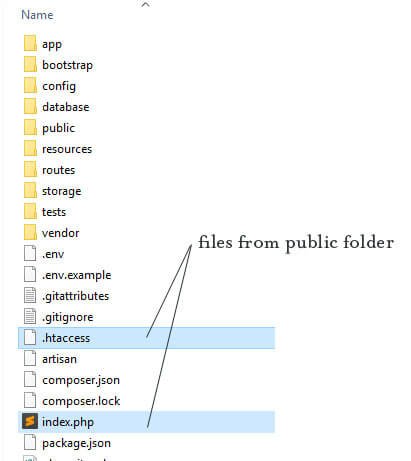
Open index.php and replace
require __DIR__.'/../vendor/autoload.php';
 TO
require __DIR__.'/vendor/autoload.php';

$app = require_once __DIR__.'/../bootstrap/app.php';
TO
$app = require_once __DIR__.'/bootstrap/app.php';
Save and close the file. Go to your browser and reload your page. Now, you should see the Laravel’s welcome page.
লারাভেল এ ভিউ ডিজাইন এ দরকারি ফানঃশন :
<!-- CSRF Token -->
    <meta name="csrf-token" content="{{ csrf_token() }}">

<!-- Get App Name And Show
set config/app.php
'name' => 'Laravel',
And also inside .env file
APP_NAME=your_app_name

<title>Invoice - {{ config('app.name', 'Inventory Management System') }}</title>

// Show Date with Formate
Date: {{ date('l, d-M-Y h:i:s A') }}

//Show Price With Format
{{ number_format($content->price, 2) }}

 OLEETECH