- Mainactivity.xml
<?xml version=”1.0” encoding=”utf-8”?>
<LinearLayout xmlns:android=”http://schemas.android.com/apk/res/android”
    android:layout_width=”fill_parent”
    android:layout_height=”fill_parent”
    android:orientation=”vertical” >

     <ListView
        android:id=”@+id/sportsList”
        android:layout_width=”match_parent”
        android:layout_height=”wrap_content”
        android:entries="@array/sports_array"
    />
</LinearLayout>
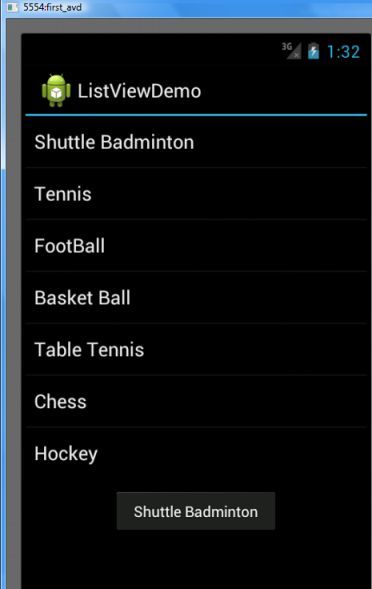
Here @array/sports_array” Is Array Define In res/values/string.xml . Open res/values/string.xml and replace it with following content.
<?xml version="1.0" encoding="utf-8"?>
<resources>
    <string name="hello">Hello World, ListViewActivity1!</string>
    <string name="app_name">ListViewDemo</string>
     <string-array name="sports_array">
        <item>Shuttle Badminton</item>
        <item>Tennis</item>
        <item>FootBall</item>
        <item>Basket Ball</item>
        <item>Table Tennis</item>
        <item>Chess</item>
        <item>Hockey</item>
    </string-array>
</resources>
3. To Set Onclick Listener You Can Modify Your MainActivity.java Like This WAy
public class ListViewActivity1 extends Activity implements OnItemClickListener{
    ListView listView;

    /** Called when the activity is first created. */
    @Override
    public void onCreate(Bundle savedInstanceState) {
        super.onCreate(savedInstanceState);
        setContentView(R.layout.main);

        listView = (ListView) findViewById(R.id.sportsList);
        listView.setOnItemClickListener(this);
    }

    /*
     * Parameters:
        adapter - The AdapterView where the click happened.
        view - The view within the AdapterView that was clicked
        position - The position of the view in the adapter.
        id - The row id of the item that was clicked.
     */
    @Override
    public void onItemClick(AdapterView<?> adapter, View view, int position, long id) {
        Toast.makeText(getApplicationContext(), ((TextView) view).getText(),
                  Toast.LENGTH_SHORT).show();
    }
}
 OLEETECH