
- Follow Mssql Connection With Android From This Link
2. Design Your Ui Like This Way
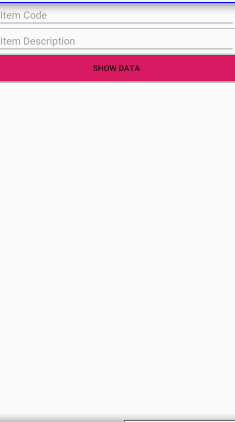
<?xml version="1.0" encoding="utf-8"?>
<LinearLayout xmlns:android="http://schemas.android.com/apk/res/android"
    xmlns:app="http://schemas.android.com/apk/res-auto"
    xmlns:tools="http://schemas.android.com/tools"
    android:layout_width="match_parent"
    android:orientation="vertical"
    android:layout_height="match_parent"
    tools:context=".MainActivity">

 <EditText
     android:id="@+id/code"
     android:hint="Item Code"
     android:layout_width="match_parent"
     android:layout_height="wrap_content" />


 <EditText
     android:id="@+id/desc"
     android:hint="Item Description"
     android:layout_width="match_parent"
     android:layout_height="wrap_content" />

    <Button
        android:background="@color/colorAccent"
        android:text="Show Data"
        android:id="@+id/showdata"
        android:layout_width="match_parent"
        android:layout_height="wrap_content" />

</LinearLayout>
3. MainActivity.java File Like This
package sap.business.one.sapdatatextview;

import android.support.v7.app.AppCompatActivity;
import android.os.Bundle;
import android.text.TextUtils;
import android.view.View;
import android.widget.Button;
import android.widget.EditText;
import android.widget.TextView;
import android.widget.Toast;

import java.sql.Connection;
import java.sql.ResultSet;
import java.sql.SQLException;
import java.sql.Statement;
import java.util.ArrayList;
import java.util.List;

public class MainActivity extends AppCompatActivity {
    private EditText code, desc;
    private Button showdata;
    private Connection con;
    private List codelist;
    private List codedesc;
    ConnectionClass connectionClass;

    @Override
    protected void onCreate(Bundle savedInstanceState) {
        super.onCreate(savedInstanceState);
        setContentView(R.layout.activity_main);
        code = findViewById(R.id.code);
        desc = findViewById(R.id.desc);
        showdata = findViewById(R.id.showdata);
        codelist = new ArrayList();
        codedesc = new ArrayList();


        connectionClass = new ConnectionClass();
        try {
            con = connectionClass.CONN();
            if (con == null) {
                Toast.makeText(getApplicationContext(), "Connection Unsuccessfull", Toast.LENGTH_LONG).show();
            } else {
                Toast.makeText(getApplicationContext(), "Connected", Toast.LENGTH_LONG).show();

            }
        } catch (Exception e) {
        }

        showdata.setOnClickListener(new View.OnClickListener() {
            @Override
            public void onClick(View v) {
                String codetext = code.getText().toString().trim();

                if (TextUtils.isEmpty(codetext)) {
                    code.setError("Please Enter Code");
                } else {

                    String query = "SELECT ITEMCODE,ITEMNAME FROM OITM WHERE ITEMCODE='" + codetext + "' ";
                    try {
                        Statement statement = con.createStatement();
                        ResultSet resultSet = statement.executeQuery(query);
                        if (resultSet != null) {

                            while (resultSet.next()) {
                                codelist.add(resultSet.getString("ITEMCODE"));
                                codedesc.add(resultSet.getString("ITEMNAME"));
                            }
                            code.setText(codelist.get(0).toString());
                            desc.setText(codedesc.get(0).toString());
                        }
                    } catch (SQLException e) {
                        e.printStackTrace();
                    }
                }
            }
        });
    }
}
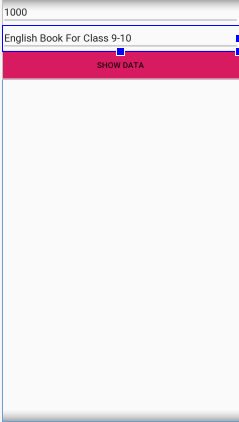
4 After Install The Apk And Fill The First Edit Text You Can View Your Data Like This Way From Your Database.

 OLEETECH